Breaking News
Loading...

Recent Post

Monday, 10 February 2014
Top 10 Useful Android Hidden Tips and Tricks

Top 10 Useful Android Hidden Tips and Tricks

Your favorite Operating System Android is a Linux based operating system designed for touch screen mobile devices. Now a days Android based mobile phones by Samsung, HTC, Sony, Micromax are so much popular that they have already covered almost 65% of total mobile phones in the market. They are user friendly and truly rich in appearance, as well as functionality. Many Android users don’t know much about the hidden features of Android mobiles. So, today I'm sharing an article which will help you to know the best secret Android Tricks and hidden features of Android devices. Different versions of Android OS support different set of tricks, so try all of the following tricks and please comment the trick which is working on your phone.
Hidden Android Secret Codes

1 - Force Reboot

Many times Android users face a problem of freezing of mobile phone. In case your Android mobile is frozen, you can easily reboot it using an android trick.

Just press Power Button + Home Key + Volume Up button simultaneously to firce reboot your device.


2 - Quick Google Access

Android mobiles are built primarily for Internet. I am sure that many of you don’t know that Android phones provide a way by which you can access Google Search in just a single click!

To use this Android trick, Press Menu key and hold it for couple of seconds. This will launch the Google Search.


3 - Reboot Android In Safe Mode

As like computers & laptops, we can also reboot an Android device in Safe Mode. The latest Android jelly bean version provides an option to reboot in safe mode, if something goes wrong.
To reboot your android in safe mode, follow the below given instructions.
For detailed guide with images to reboot Android device into safe mode, follow this article - Boot Your Android Device Into Safe Mode [How To]

1 - Long press the power button
2 - Long press on the power off option on the screen.

Your phone will show a confirmation message about rebooting it in safe mode, if we reboot android phone in safe mode then all the third party application will be disabled. These applications can again be enabled when we restart your phone normally. This is a great android feature in case when a a 3rd party application is causing trouble for you and you want to hunt it.


4 - Unlock Android Phones By Face Detection

This is a cool Android feature by which you can unlock your mobile phone by using face detection. In the Android Jelly Bean version provides a way by which the phone can be unlock using face detection. To make the feature more secure and useful, jelly bean version added another layer of protection, in which android phone can be unlocked only when the face is matched as well as we have to blink our eyes in order to unlock phone. Blinking of eyes tells the Android Security System that the person is alive and it is not an illegal attempt of unlocking phone. This also prevents unlocking of phone by using photocopy.
For detailed guide and information (with images!) to unlock phone by face detection, follow this article -
Set Up Face Unlock On Android Devices
To activate this feature,
  1. Go to Settings.
  2. Tap on Security.
  3. Select Screen lock
  4. Select Face Unlock.


5 - Get Detailed Information About Phone Status

We can get the detailed statistics of our smartphone like Phone Information, Battery Information, Usage Statistics and WiFi information by just dialing *#*#4636#*#*.
This is a handy USSD code to get all the details about battery usage, DNS check, Ping, Application time usage time and so on.

For ALL the USSD codes to get information of phone, bluetooth, wifi, camera, firmware, screen, hardware, etc. of your device, read this article - Best 30 Useful Secret Codes For Your Smartphone


6 - Move Installed Apps to SD Card

Its good idea to install Android applications in SD card. Installing apps into phone memory makes your phone slow. But what if you have already installed apps on your phone memory? Don’t worry! Android phones provide a way by which we can move all our apps to SD card.

To move apps to SD card, follow these steps:
Go to settings > Application settings > Manage application > Select the application, You will see the option “Move to SD card”. Click on it and your done.


7 - Hard Reset and Factory Reset your android phone

This android trick comes handy at the time of selling your Android phone. This will delete all the apps, contacts, SMS, files saved in phone memory.
(Note - Be careful while using this trick. I will not be responsible if you loss important data by using this trick.)

Android phone can be formatted in two ways:
  • Factory reset
  • Hard reset
FactoryReset - In factory reset, your phone is being formatted to factory level. Means all the settings will go by default and all the internal memory data will be deleted. To factory reset a phone dial *#*#7780#*#*.

Hard reset - To hard reset your phone just dial *2767*3855#, this will delete all the data (including internal and External SD data) as well as settings of  your android phone. Don’t try this code for testing purpose, until you are not sure. This code will not ask for a confirmation.


8 - Context Menu In Android

Long Press on the screen. This will show you additional options for customizing Android phones. This context menu is somewhat similar to the right click menu of windows operating systems for PC.


9 - Taking Screen Shots On Android Phone

Android operating system offer a great feature by which we can take the screen shot without using any third party application. However the steps for taking screenshot vary from one android version to another version. This trick works great on most of the android phones.

For MOST of the phones - Press the Home button + Power button simultaneously.
For Galaxy Nexus - Power button + volume down button.
For Galaxy Note 2 and S3 - Swipe your palm on the screen to take screen shot.


10 - Android Version Animation

This is another cool android trick to play with your android phone. To use this android animation, Go to Settings > About Phone > Tap repeatedly on ‘Android Version’.
After some taps (5 Taps on my Galaxy S Duos), the android version of your mobile will be displayed with some animation. If you are using Jelly Bean version, then you can play with this animations!
Friday, 7 February 2014
Get Free Unlimited Mobile Recharge And Send Free SMS

Get Free Unlimited Mobile Recharge And Send Free SMS

Hey friends! I'm back with a new post for Earning TOTALLY FREE mobile recharge! By using this trick you can get UNLIMITED free Mobile Recharge online. We will use a website named Ultoo for this. You can send Free SMS using this website.You can upload a contact list and start sending sms & win free recharge.
Free Recharge using Ultoo

Recommended Article - Top 5 Mobile Apps That Earn You Free Recharge & Rewards


Features -

- Rs. 2 Sign Up Bonus
- You will get 2 Paisa per each free sms you send. So send more SMS for more recharge.
- You can invite your friends to Ultoo by SMS or Email. And you will earn Rs.2 for each user that registers successfully through your invitation.

- Daily Login Bonus! Get 10 Paisa daily for free just for visiting Ultoo.
- Rs. 1 For Email Verification
- Play games like Poll and contest and earn money.

An average person sends atleast 50 to 100 SMS per day to his friends by using his SMS pack. We pay around Rs. 75 for this recharge. But by using this trick, you will be paid for sending free SMS! You can easily earn Rs. 300 monthly by sending SMS and reffering your friends.


Steps To Get Free Recharge -


Step 2 - Fill Up the easy Sign Up form by entering your Name, Email Address, Mobile Number, Your City and your Date of birth, etc.
Ultoo Signup

Step 3 - Click On SIGN UP

You will get a message from Ultoo with your password to your mobile number. Enter that password is the next screen. You can change your password after logging in.

Done! Now start sending SMS and earn free recharge!
Tuesday, 4 February 2014
Flash Guide Nokia 5233 To Install LinsPirat Belle

Flash Guide Nokia 5233 To Install LinsPirat Belle

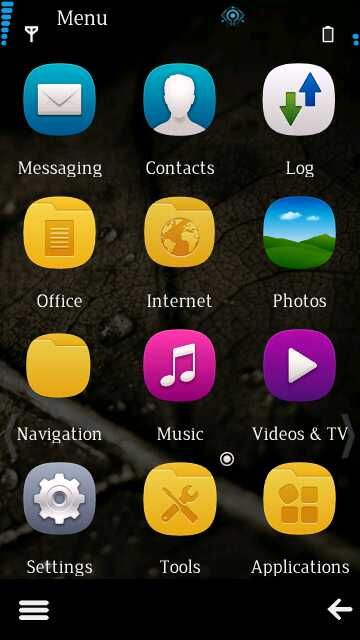
In my last post Symbian Belle Firmware For Nokia 5233, I have explained about an awesome firmware LinsPirat for Nokia 5233 mobile which works on Symbian OS. In this post I'm giving a complete installation tutorial to install LinsPirat on your Nokia 5233 handset. Here are some snapshot of the CFW.


Before Starting, Download and install (if this or latest framework is already installed in your computer, no need to download this file) .NET Framework 2.0

Installation Files For Nokia 5233 RM-625 -

    -Nokia 5233 RM625 - Download (77.44 MB)
      -RM-625 V51.1.002 New Core by Binh24 - Download (26.06 MB)


      Download Flashing Tools
      Download - Jaf Imulator  (Contains jaf setup.exe , Pkey Emulator)
      Install jaf setup.exe.

      Click to start download -Jaf_nok4models.rar (21 KB Only)
      Extract file and copy jaf_nok4models.ini to folder C:\Program Files\ODEON\JAF (Replace original file)
      (Note - This file is very important so please don't ignor this file. This file will show up "Nokia 5233" option in Jaf Imulator)

      You have to install Nokia PC Suite. If you dont have Download from Here.

      Flashing with JAF
      1 - Create directory C:\Program Files\Nokia\Pheonix\Products\RM-625

      2 - Extract file LinsPirat LTS Rev2.1 RM625 with Plus!.7z

      3 - Copy RM625_51.1.002_000_001_U001.uda.fpsx and RM-625_51.1.002_prd.rofs2.V21 and paste into  C:\Program Files\Nokia\Pheonix\Products\RM-625

      4 - Extract RM-625 V51.1.002 New Core by Binh24.rar

      5 - Copy all 4 files -
      -RM-625_51.1.002_prd.core.C0r
      -RM625_0597963_51.1.002_001.dcp
      -RM625_0597963_51.1.002_001.vpl
      -RM625_0597963_51.1.002_001_signature.bin
      Paste these files in folder C:\Program Files\Nokia\Pheonix\Products\RM-625.

      6 - Now, copy all the files in folder C:\Program Files\Nokia\Pheonix\Products\RM-625 and paste them on Desktop (Create new folder on desktop and paste them into it)

      7 - Connect your phone with PC Suite Mode.

      8 - Now go to the folder where you extracted JAF EMULATOR. Open jaf pkey emulator.exe in Compatibility Mode. (To open this file in compatibility mode, right click on it, click on compatibility tab, and select Windows xp service pack 3 OR Windows xp service pack 2)


      9 - Now click GO. (Dont make any changes.) 


      10 - Then you will see Error: "BOX DRIVER NOT INSTALLED" . Just click OK (Don't panic).


      11 - Now click on BB5 tab and untick CRT 308 and tick following - 
          *Manual Flash     *Dead USB      *Use INI (when you click USE INI, a dialog box will apear. just select NOKIA 5233 and click OK)


      12 - Follow these steps:
      -Click MCU and select the RM-625_51.1.002_prd.core.C0r file  -Click PPM and select file RM-625_51.1.002_prd.rofs2.V21  -Click APE Variant and select file RM625_51.1.002_000_001_U001.uda.fpsx -IGNOR CNT

      13 - Hard Reset your mobile.


      14 - Now TURN OFF your phone !!! Then click FLASH button. After that press and hold POWER button (button on mobile to switch it on/off) for 1 seconds (don't hold more then 1 second! you are NOT switching on your mobile) and JAF now will start flashing.
      If JAF dont detect your phone then try again and again until it is detected . 


      15 - JAF will complete installation within 5 minutes. After completing flashing your phone will restart. 
      Final Screen After Installation Completes.
      Note -
      1. You cant downgrade from new version to old. It will break your phone.
      2. If your phone breaked (dead) while flashing then flash again.
      FEEL FREE TO COMMENT IF YOU HAVE ANY PROBLEM :D
      Symbian Belle Firmware For Nokia 5233

      Symbian Belle Firmware For Nokia 5233

      The Craze of Mobile Phone Bricking is on the GO! Peoples are bricking their phones with suitable custom firmwares to give their homescreen a stylish new look. Here’s presenting, an Amazing Symbian Belle Custom Firmware for Nokia 5233 – All RMs of combined styles – Anna & Belle – AnnaBelle, named LinsPirat LTSrev2 byTinTinBoss.
      This new custom firmware is compatible with all the versions of the mentioned phone models and comes with Anna Icon Sets, New Theme Effects, Super Fast Sensor, Kinetic Scrolling and much more.  This is not completely Belle Firmware, but this cfw is much more awesome than Belle when you use the Bonus LinsPirat HD Wallpapers. Check out the features and screenshots after the jump!


      Also Read -


      First of all, I would like to say that, this cfw is Simply Awesome and Best cfw I’ve ever used!  If you are a Graphics Freak and Love your Phone to look pretty, then this cfw is what you need.

      Quote from TinTinBoss  

      "So, here it is, I want to share you “what I had in mind while developing this” 
      “LinsPirat LTS” is unlike “LinsPirat v1.0″ – a more professional and sober looking OS. You can say – a fat-less LinsPirat  . I tried to achieve a state where you feel different using your very known Nokia Device. Don’t know if I failed or achieved tiny bit of success.As with LinsPirat v1.0 Designed by me all the way (Surely grabbing ideas from here and there and combining my tastes). Own resources and vector arts. With LinsPirat LTS feel a more sophisticated and eye friendly UI." 

      Important Notes - 

      • You can't get your original operating system back. 
      • Use this tutorial if you have NOKIA 5233 with RM-625 and firmware version 51.1.002
      • Do this on your own. 
      • This firmware is tested on thousand of mobiles and working fine. Don't make any mistakes while installation. 
      • If you have firmware newer than. 


      Sneak Peak -

      • Huge Performance Upgrade.
      • QT Integrated.
      • LinsPirat Music Theme Reworked.
      • LinsPirat Plus Pack added with download. (contains All LinsPirat Themes and Wallpapers + Working latest Ovi Store)
      • New Never seen before Sparkling swipe to answer and new Swipe to Unlock.
      • Camera Hardware key fixed.
      • Smoother Kinetic Srolling.


      What's New? Features -

      • Fast and Colorful (60MB+ RAM at Start Up , Loads of color in LinsPirat theme).
      • NEW! LinsPirat LTS (Music) Theme! 
      • NEW! LinsPirat LTS (Music) Walls. 
      • NEW! LinsPirat LTS theme. 
      • NEW! 5 LinsPirat Ringers (Personally edited from fav tunes). 
      • LinsPirat v1 theme Revamped (will be available for Auto Installer). 
      • New! 6+2 LinsPirat HD walls. 
      • Music Player Supporting Karaoke with any .lrc file (15.2 default). 
      • NEW! — Windows Phone 7 Giant font! (Have a plan to release giant version in future.) 
      • New and reworked ANIMATED LinsPirat LTS Boot Screen (mbm file for smooth animation). 
      • LinsPirat v1 Theme included – (Colorful and with Anna POP Icons) 
      • 5 Extra equalizer presets. 
      • Glossy Swipe to unlock. 
      • Common Good Apps cooked within CFW. 
      • ROM Patcher with proven patches. 
      • Personal Server Links. 
      • Effects : Android Theme effects by nhelske. 

      Also Read -

      Trace Any Mobile Number With Name And Location


      Screen Shots -


      (Click on image to view full size)


      N97 Mini V30 Change Logs -

      • New, faster version of the Web Browser, including web search integrated into the web address field, and support for multiple windows.
      • New, Quicker and Easier Chat and Mail Applications.
      • Updated Music player with folder playlists and lyrics support.
      • New Imotions and smileys in text and multimedia messages.
      • Performance and usability improvements.
      • Ovi Contacts removed.
      • Smart Dialer.
      • Fully hacked CFW.


      Also Read - 


      Installation Files -

      • Nokia 5233 RM625 - Download (77.44 MB)
      • RM-625 V51.1.002 New Core by Binh24 - Download (26.06 MB)
      If you Hard Reset or Factory set your device, please flash your device again to get the 5 New Equalizer Preset.


      Installation Notes -


      • Use provided UDA (Otherwise you wont get 5 equalizer presets).
      • Use v50 core for RM-625 by binh24.
      • Format Memory Card From within phone before you give it a go.
      • Restart Device after flash.

      Hike Messenger - Best Cross Platform Messenger 2014

      Hike Messenger - Best Cross Platform Messenger 2014

      Today, I'm gonna recommend you the best cross platform mobile messaging app that we think you should check out.  It is a better way to communicate with all your friends who use instant messaging apps on mobile phone platforms like Android, iOS, BlackBerry, Windows or even on your old Nokia's Symbian series mobile phones. The most important thing is that, it is the first Indian Messenger Made With Love In India.


      Hike - Best Cross Platform Messenger
      Hike Messenger is a very easy and convenient way to communicate with your friends and family either over WiFi or over the cellular internet connection. It focuses strictly on messaging. It is a message option with support for push notifications, group conversations, stickers, smileys and more, that your friends are most likely already tied into.

      Must Read - Get Daily Rs. 200 Free Recharge | Hike Messenger


      As compared to Whatsapp messenger, with over 2 million registered users, you may find that more peoples are using it than you think. Hike is also available for a broad number of platforms including Android, iPhone, BlackBerry, Windows Phone, Nokia S40, and Symbian. Hike messenger also supports unlimited group messaging as well as unlimited audio, video, and photos sharing. It is also got a pretty nice interface with changable themes, which is an added bonus.


      It is a open source instant messaging application and is very similar to Whatsapp, BBM, Kik but with so much more characters, lots of great smiles, featured smiles, awesome stickers and advanced features. It is a beautiful yet simple application. Great way to keep in touch with close friends and family members. The best thing is that, it gives free rewards for reffering your friends to hike! This reward can be used for free Topup Recharge. Think of hike messenger as it is made for the new generation.

      Links To Download Hike Messenger For Android, iOS, BB, Windows and Symbian- 
      Click Here To Expland Download Links


      Monday, 3 February 2014
      Top 5 Mobile Apps That Earn You Free Recharge & Rewards

      Top 5 Mobile Apps That Earn You Free Recharge & Rewards

      There are lots of peoples who spend money on downloading apps for Android OS. But most of the Android users are not much aware that they can earn Real Cash and Rewards by using special applications on your smartphone. Yeah! that's true...! You just need to install and do some really easy tasks.


      Following are the Android apps which displays their deals, content and Ads as full screen pictures on mobile screen. By using its proprietary technology these pictures come up as soon as a user unlocks the handset screen, which means user is bound to see the adverties featured there. The advertising is non intrusive and users are free to interact in many ways, right from double tapping on the image to launch the marketer's website, or landing page to dismissing it.


      Eureka -
      Eureka is a first recommended app. It is the world's first app which pays you rewards to watch deals, Ads and strange content on your smartphone. It will reward you on monthly basis in the form of recharge. If you are prepaid customer then you will get topup else mobile discount for postpaid users. You just need to install this app and then watch their ads while unlocking your phone.


      For more information, visit - Eureka in Play Store


      MAdLock -
      MAdLock is an Android based lock screen application which displays beautiful advertieses on the Lock screen of smartphone as well as you can earn upto ₹300 per month by installing and using it. This app is very similar to Eureka, you will earn by just viewing the ads. Your MAdLock money will increase on daily basis, which you can check from MAdLock Manager -> Money section.


      For more information, visit - MAdLock in Play Store
      NOTE - FOR FREE ₹50 BONUS, USE REFERRAL CODE - 598INQ


      Paisa Swipe Beta -
      You can earn upto ₹3000+  per year, just by unlocking your android lock screen, which will be the easiest money you will ever make! Make sure that you are connected to a proper working internet data connection. Besides getting free money for recharge and to pay your bills, they also gives a lots of awesome free prizes to lucky active users! So if you refer lots of friends you can get bonus rewards which allows for ₹4000+ rupees per month!

      For more information, visit - Paisa Swype In Play Store


      SmartPhoneMate -
      The developers of this app are belongs to research firm, build to study Smartphone industry. They always try to understand and study about how smartphone users use their smartphone. They will pay you to share how you use your mobile phone for every month, you just need to install this app, then click Post Data Now twice daily.


      For more information, visit - Smart Phone Mate In Play Store


      Rokda -
      Rokda is a last but not least application which is exactly similar to Paisa Swipe Beta. Download Rokda Application. Sign Up and Register Mobile Number, view ads orcontent on Lock-screen to earn free Credits for Recharge.
      Quick Message
      Press Esc to close
      Copyright © 2014 Mobile Tricks | Designed and Bloggerised By Pradeep Jadhav